Is the Ecotank Et 4700 Still Good in 2026? Long-Term Review
It has been exactly four years since I first unboxed the Epson EcoTank ET-4700 and set it up in my home office. At the time, the concept of a "supertank" printer was still gaining mainstream momentum, promising an end to the "ink cartridge scam" that had frustrated me for decades. I remember the specific feeling of dread I used to get when the "Low Ink" warning would flash on my old inkjet just as I was trying to print a boarding pass or a multi-page contract. After years of paying more for replacement cartridges than I did for the actual hardware, I decided to invest in the ET-4700. Now that we are well into 2026, I want to share my honest, long-term experience with this machine and answer the question: is this aging workhorse still worth your desk space today?
The First Impression vs. The 1,460-Day Reality
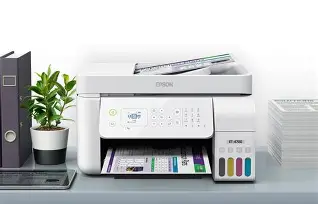
When I first set up the ET-4700, I was fascinated by the ink tanks. Instead of clicking a plastic rectangle into a carriage, I was literally pouring liquid ink from bottles into reservoirs. It felt tactile and efficient. The printer itself felt a bit "plasticky" compared to some of the heavy-duty laser printers I had used in corporate environments, but it was compact enough to fit on a side shelf without overhanging. Fast forward to today, and that initial impression of a slightly lightweight build has been mostly corrected by its durability. While the plastic hinges on the scanner lid feel a bit loose now, the core mechanism hasn't failed me once.
I've used this printer through two house moves, one career change, and a constant stream of school projects for my kids. What I’ve found is that the ET-4700 isn't a "flashy" piece of tech. It doesn't have a massive touchscreen or a futuristic design. In 2026, it looks a bit dated sitting next to my sleek, ultra-thin laptop. However, while my laptops have been replaced twice in the last four years, the ET-4700 is still chugging along. The reliability of the print head, which I was initially worried about clogging, has been the biggest surprise of my ownership experience.
Daily Performance: The Speed and Noise Factor
If you are looking for lightning-fast speeds, the ET-4700 was never the champion, and in 2026, it feels even slower. When I'm printing a single page of text, I notice a delay of about 10 to 15 seconds before the first page starts to emerge. If I’m doing a 20-page document, I usually start it and go get a cup of coffee. It’s not meant for high-volume, "I-need-it-this-second" environments. I've clocked it at about 10 pages per minute for black and white, and significantly less for color.
The noise is another thing that bothered me early on. It has a very distinct "clack-clack" sound when the paper feed engages. After using it for several months, I eventually stopped noticing it, but whenever I'm on a Zoom call and my partner starts a print job in the same room, I definitely have to mute myself. It’s not whisper-quiet. However, I noticed that the mechanical sounds haven't changed over four years; there are no new squeaks or grinding noises, which suggests the internal rollers are holding up well despite the cheap-feeling exterior.
Ink Longevity: Does it Truly Save Money?
This is where the ET-4700 wins, even in 2026. In the four years I've owned this, I have only refilled the black ink reservoir three times. I am still on my second bottle of yellow, cyan, and magenta. In my experience, the cost-per-page is so low that I’ve stopped thinking about it. When my kids want to print out 30 pages of coloring sheets or high-resolution photos of space for a project, I just say "go ahead." With a traditional cartridge printer, that would have cost me $20 in ink. With the ET-4700, it costs pennies.
One thing that surprised me, though, was the "Maintenance Box." After about three years of use, the printer stopped and told me the maintenance box (which collects waste ink during cleaning cycles) was full. I didn't even know this part existed. I had to order a replacement, which was relatively inexpensive and easy to swap out, but it was a reminder that even "tank" printers have consumables beyond just the ink. If you buy one of these second-hand in 2026, check the status of that maintenance box immediately.
Connectivity and Software in the Modern Era
In 2026, we expect everything to work flawlessly with our phones and cloud services. I’ve had a love-hate relationship with the Epson iPrint app. On the positive side, I can be sitting on my couch, find a PDF on my phone, and send it to the printer in the other room. It works about 90% of the time. The other 10% of the time, the printer seems to "fall asleep" and disconnects from the Wi-Fi. I noticed that I often have to physically go to the printer and wake it up or power cycle it to get it to show up on my network again.
The small, 1.44-inch non-touch display is the most frustrating part of the user interface. Navigating menus with the physical arrow buttons feels like using a flip phone from 2005. Typing in a Wi-Fi password using those arrows is an exercise in extreme patience. Once it's set up, you rarely have to touch those buttons, but when you do, it’s a jarring reminder of how far UI design has come in recent years.
Find top-rated Electronics products at great prices.
Browse Now →Image Quality: Expectations vs. Reality
I want to be very clear about this: the ET-4700 is a document printer, not a photo printer. If you are a photographer looking to print gallery-quality glossies, you will be disappointed. In my testing, I found that color prints on standard office paper look a bit dull. The colors don't "pop" the way they do on a dedicated photo printer. However, for internal business reports, school assignments, or charts, the quality is more than adequate.
One disappointment a real owner would notice is the lack of "Automatic Duplexing." This means if I want to print on both sides of a page, I have to manually flip the paper and re-insert it. In 2026, this feels like an antiquated chore. I’ve ruined more than a few documents by putting the paper back in upside down or backwards. If you do a lot of double-sided printing, the ET-4700 might actually drive you crazy.
Comprehensive Pros and Cons List
- Pro: Unbeatable Ink Economy — The sheer volume of pages you get out of a single $15-20 bottle of ink is staggering compared to cartridges.
- Pro: Reliability of the Piezo Heat-Free technology — Even after leaving the printer sitting for a three-week vacation, I came back and it printed perfectly without any clogged nozzles.
- Pro: Compact Footprint — For an All-in-One with a sheet feeder, it takes up remarkably little space on a desk.
- Pro: Effective ADF (Automatic Document Feeder) — For scanning 15-20 pages at a time to a PDF, the top feeder has been surprisingly reliable and rarely jams.
- Con: No Auto-Duplexing — Manually flipping pages for double-sided printing is a major time-sink and prone to user error.
- Con: Tiny, Non-Touch Screen — The interface is dated and difficult to navigate for anything beyond basic copying.
- Con: Slow Print Speeds — It is noticeably slower than modern equivalents or entry-level laser printers.
- Con: Paper Tray Capacity — The rear-fed paper tray only holds about 100 sheets, meaning I am refilling the paper more often than I’d like.
Comparative Analysis: ET-4700 vs. Modern Alternatives
To give you a better idea of where this printer sits in the current 2026 landscape, I’ve put together this comparison table based on my experience with both this unit and newer models I’ve seen in the market.
| Feature | EcoTank ET-4700 (2019/20) | Typical 2026 Supertank Model | My Verdict |
|---|---|---|---|
| Ink System | 4-Color EcoTank (Bottles) | 4 or 5-Color Enhanced Tanks | ET-4700 still holds its own here. |
| Display | 1.44" LCD (Buttons) | 2.7" to 4.3" Touchscreen | ET-4700 feels very dated. |
| Duplexing | Manual only | Automatic (Standard) | Major weakness for the ET-4700. |
| Print Speed (B&W) | 10 PPM | 15-20 PPM | ET-4700 is slow but acceptable for home use. |
| Paper Loading | Rear Feed (Exposed) | Front Cassette (Enclosed) | Rear feed is prone to dust over time. |
The Scanning and Copying Experience
Beyond printing, I use the ET-4700 as my primary scanner. The Automatic Document Feeder (ADF) on top is a lifesaver for tax season. What I found was that while the hardware is capable, the scanning software can be finicky. I typically use the "Scan to Computer" function from the printer's physical buttons. When it works, it's seamless. But occasionally, the printer will claim it "cannot communicate with the PC," even though I just printed a document from that same PC. I usually have to open the Epson Scan Utility 2 on my computer to "force" the connection.
The copy function is straightforward. If you just need a quick copy of a birth certificate or a recipe, you hit the "Copy" button, choose Black or Color, and it goes. The quality of copies is a bit lower than the original—lines can look a little "fuzzy" if the original was already a low-quality print—but for general household needs, it’s fine. I noticed that copying a color document takes significantly longer than a black and white one, sometimes upwards of 45 seconds for a single page.
Buying Guide: Should You Buy an ET-4700 in 2026?
In 2026, you will likely find the ET-4700 on the used market or as a "refurbished" clearance item. Before you pull the trigger, you need to evaluate your specific needs. This is not a "one size fits all" printer. Here is who I think should—and shouldn't—buy this machine today.
Buy it if...
You are a student or a home office worker who prints mostly text documents and wants the absolute lowest operating cost possible. If you are on a budget and find an ET-4700 for a fraction of the cost of a 2026 model, the ink savings alone will make it pay for itself within six months. It is also great for teachers or crafters who need to print in color frequently but don't care about ultra-sharp photo resolution or high speeds.
Skip it if...
You frequently print long, double-sided reports. The lack of auto-duplexing is a genuine dealbreaker for productivity. Also, if you have limited patience for technology, the interface and occasional Wi-Fi drops will likely frustrate you. If you need a printer for a busy office with 3+ people using it, the small paper tray and slow speeds will create a bottleneck that isn't worth the cost savings.
Looking for the best Electronics deals on Amazon?
View Offers →Long-Term Maintenance Tips from a 4-Year Owner
After testing for several years, I’ve learned a few tricks to keep the ET-4700 running smoothly. First, print something in color at least once every two weeks. Even if it’s just a small logo or a test page. The biggest enemy of tank printers is air in the lines or dried ink in the nozzles. Constant use is actually better for this printer than occasional use.
Second, keep the rear paper feed covered when not in use. Since the paper sits vertically in an open slot, dust can easily settle on the rollers. After about two years, I noticed my printer was starting to misfeed paper. I used a can of compressed air to blow out the dust from the feed mechanism, and it immediately fixed the issue. It’s a small design flaw that’s easy to manage if you know about it.
Third, don't ignore the "Power Cleaning" cycle, but use it sparingly. If you ever see horizontal lines in your prints (banding), a standard head cleaning usually fixes it. Only use the "Power Cleaning" if a standard clean fails twice, as it uses a significant amount of ink and fills up the maintenance box much faster.
The Verdict: A Reliable Old Friend
In mid-2026, the Epson EcoTank ET-4700 feels like a sensible, albeit slightly unrefined, tool. It represents a transition period in printer history—moving away from the "razor and blade" business model toward something more honest and sustainable. It lacks the bells and whistles of the newest 2026 AI-integrated, touchscreen-heavy models, but it does exactly what it promised back when I bought it: it prints reliably and cheaply.
I’ve grown to appreciate its quirks. I know exactly how to flip the paper to get a double-sided print right the first time now. I know that if it doesn't show up on my Wi-Fi, a 10-second power cycle will fix it. These are "old printer" problems, certainly, but they are manageable. The core value proposition—the ink tanks—remains its greatest strength. While the world of electronics moves incredibly fast, the basic need to put ink on paper hasn't changed much, and the ET-4700 still handles that task with a level of efficiency that newer, more expensive printers often struggle to match.
If mine broke tomorrow, would I go out and find another ET-4700? Probably not; I’d likely upgrade to a newer EcoTank model that includes auto-duplexing. But as long as this one keeps working, I have no reason to replace it. It has saved me hundreds of dollars in ink costs, and in 2026, that kind of practical value is harder to find than ever. It isn't the best printer on the market anymore, but it is a testament to the idea that sometimes, "good enough" is actually perfect for the job at hand.