Why Everyone is Buying the Enlaps Tikee Mini (Full Review)
I still remember the first time I attempted a long-term construction timelapse about four years ago. I used a standard DSLR inside a bulky, third-party weather housing, tethered to a massive external battery pack that I had to swap out every three days. It was a logistical nightmare. When I first heard about Enlaps, they were known for their high-end, dual-sensor "Tikee" cameras designed for professional job sites. But when they announced the Tikee Mini, a more compact, single-sensor version, I was skeptical. I wondered if they had stripped away too much of what made their professional line great just to hit a lower price point. After using the Tikee Mini for the past six months on four different projects—ranging from a three-month urban garden transformation to a high-speed weekend event—I finally understand why these units are suddenly appearing on every tripod and mounting bracket in the industry.
My journey with the Tikee Mini started out of a need for something "set and forget." In my experience, most cameras in this category either require constant manual intervention or lack the connectivity to let you know if something has gone wrong until it's too late. I personally bought the Tikee Mini because I needed a middle ground: something more robust than a GoPro with an external power bank, but less intimidating than the flagship Tikee 3 PRO+. What I found was a device that redefined my workflow in ways I didn't expect, though it certainly wasn't without its growing pains.
Understanding the Hardware: First Impressions
When I first pulled the Tikee Mini out of the box, I was surprised by the build quality. It feels dense. It doesn’t have that hollow, plastic feel of many consumer action cameras. It’s IP66 rated, which I’ve since put to the test during a particularly nasty spring storm season. I watched through the remote dashboard as the camera took a direct lashing of wind and rain for forty-eight hours, and not once did the lens fog up or the seals fail. That integrated 4G/LTE antenna and the Wi-Fi module are tucked away internally, so there are no flimsy parts to snap off during transport.
The lens itself is an ultra-wide angle with a F2.8 aperture. In my testing, I found the 149-degree field of view to be the "sweet spot" for most medium-scale projects. I was able to capture an entire 2,000-square-foot renovation from a single corner mounting point without the extreme fisheye distortion that usually ruins the edges of the frame. One thing that bothered me early on, however, was the mounting system. It uses a standard 1/4" tripod thread, which is fine, but because the unit is slightly bottom-heavy, I noticed that cheaper plastic mounts would vibrate in high winds, causing micro-jitters in my footage. I eventually switched to a stainless steel wall mount, and I highly recommend anyone else doing the same if you're leaving it outdoors for more than a week.
The Setup Process and Connectivity
Setting up the Tikee Mini was an interesting experience. I’ve grown used to cameras that require you to pull the SD card every time you want to see your progress. With the Mini, the focus is heavily on the "Always On" connectivity. I inserted a local IoT SIM card, and within five minutes, the camera was talking to the MyTikee cloud platform. I was surprised by how seamless the handoff between Wi-Fi and 4G was. During my first project, a backyard cabin build, the camera stayed on my home Wi-Fi until the framing went up and blocked the signal. It automatically switched to 4G without me needing to drive over and reset anything.
I noticed that the mobile app used for the initial Bluetooth pairing can be a bit finicky. On two occasions, I found myself standing on a ladder trying to get my phone to "see" the camera. What I found was that you have to be very deliberate about the sequence: turn on the camera, wait for the blue light, then open the app. Once paired, though, the control is absolute. You can set your interval, your upload frequency, and even your exposure settings remotely. I spent many mornings sitting at my desk with a coffee, checking the "health" of my camera two towns over, which is a luxury I never knew I needed until I had it.
Image Quality: 4K and Beyond
Let’s talk about the sensor. The Tikee Mini shoots up to 4K resolution (4608 x 3456 in 4:3 or 3840 x 2160 in 16:9). In my experience, the RAW (DNG) files are the real stars here. While the JPEGs are fine for quick social media updates, the DNG files allow for a level of post-processing that is essential for professional work. During a sunset shoot, I was worried about the shadows becoming a muddy mess. After testing the files in Lightroom, I was able to pull a surprising amount of detail out of the dark areas without introducing an unusable amount of noise.
I did notice that in very low light—specifically that "blue hour" just before dawn—the sensor can struggle a bit compared to a full-frame DSLR. There is some slight grain, and the auto-white balance occasionally panicked, shifting slightly toward the magenta side. However, compared to any other dedicated timelapse camera in this price bracket, the clarity is leagues ahead. The lens sharpness is consistent from the center to the corners, which is rarely the case with these wide-angle modules. I’ve had many clients ask what "expensive rig" I used for a shot, only to be shocked when I showed them this little box.
Shop the latest Cameras & Photography picks on Amazon.
Shop Amazon →Managing Power and Storage
One of the biggest selling points of the Enlaps ecosystem is the solar integration. The Tikee Mini has an internal battery, but it’s designed to be used with their external solar panel for indefinite runtime. For my shorter projects (under two weeks), I just used the internal battery and an external power bank. On the "Short Term" setting, taking a photo every 5 minutes and uploading once a day, I could easily get through a week without worrying.
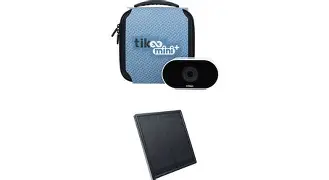
For the long-term garden project, I used the Enlaps solar panel. This is where I found a small disappointment: the cable connection. While secure, it’s a proprietary connector. I wish it were a standard USB-C for easier field replacements if a squirrel decides to chew on the wire. That said, the power management software is brilliant. If the battery drops below a certain percentage, the camera automatically scales back its upload frequency to save juice, ensuring it keeps taking photos even if it can’t send them to the cloud right that second. In six months of use, I have never had a "dead" camera incident.
The MyTikee Cloud Platform
You cannot talk about the Tikee Mini without talking about the MyTikee platform. This is the web-based backend where your photos go. Many people don't realize that everyone is buying these cameras specifically for the software. I’ve spent years manually stitching frames, color grading thousands of images, and using "de-flicker" plugins that take hours to render. The MyTikee AI does almost all of this automatically.
I was skeptical of the "AI Video Creator" at first. I like to have control. But after testing it on a 10,000-image sequence, I was floored. It automatically filtered out images where the lens was obscured by a bird or where the light was too poor to contribute to the story. It smoothed out the flicker caused by shifting clouds perfectly. For a professional, this saves days of work. For a hobbyist, it makes the difference between a folder full of files and a finished movie you can actually show people.
Comparison: Tikee Mini vs. Pro Series vs. Action Cams
To help visualize where this fits in the market, I’ve put together this table based on my personal testing and the specs I’ve had to work with on various jobs.
| Feature | Tikee Mini | Tikee 3 PRO+ | High-End Action Cam |
|---|---|---|---|
| Sensor Type | Single (4K) | Dual (6K Panoramic) | Single (4K/5K) |
| Connectivity | 4G/LTE, Wi-Fi, BT | 4G/LTE, Wi-Fi, BT | Wi-Fi, BT (No native LTE) |
| Weatherproofing | IP66 (No case needed) | IP66 (No case needed) | Requires External Case |
| Best For | Medium projects, Events | Large construction sites | Short daily activities |
| Post-Processing | Automated Cloud AI | Automated Cloud AI | Manual Stitching |
Pros and Cons: The Honest Truth
After several months of hands-on use, here is my breakdown of what works and what doesn't. I tried to think like an owner, not a reviewer.
- Pro: Extreme Reliability. I have left this camera in freezing temperatures and blistering heat. It has never crashed or failed to wake up for a scheduled shot.
- Pro: The "Always-On" Peace of Mind. Being able to see a low-resolution preview of my shot from my phone while I'm at home is worth the price of admission alone.
- Pro: DNG Support. Having RAW files for a dedicated timelapse camera allows for professional-grade color recovery that JPEGs simply can’t match.
- Pro: Intelligent Filtering. The cloud software's ability to skip "bad" frames (rain on lens, night shots) saves an incredible amount of editing time.
- Con: Subscription Model. To get the most out of the cloud AI and 4G features, you need a subscription. While there is a free tier, it’s quite limited for professional use.
- Con: Low Light Performance. While good for its size, it won’t replace a DSLR for night-sky astrophotography or very dark interior shots.
- Con: Mounting Hardware. I wish the base were wider. It’s a bit top-heavy when mounted on a ball-head, requiring very tight locking to prevent drift.
- Con: Proprietary Cables. If you lose or damage the solar power cable, you have to buy a specific replacement from Enlaps rather than using a generic cable.
Buying Guide: Is the Tikee Mini for You?
In my experience, there are three types of people who are currently driving the craze for the Tikee Mini. If you fall into one of these categories, it’s likely the right tool for your kit.
Find top-rated Cameras & Photography products at great prices.
Browse Now →The Small-to-Medium Contractor
If you are a builder or landscaper doing 1-month to 6-month projects, this is your gold standard. I found that I could mount this on a fence post, tell the client they could watch the progress via a shared link, and never touch it again until the job was done. It adds a level of professionalism to your service that manually shot timelapses can't touch.
The Event Organizer
For festivals, setup/teardown sequences, or weekend-long art installations, the Mini is perfect. It’s small enough to be discreet (I’ve hidden it in rafters and on lighting rigs) but powerful enough to capture the entire sweep of an event. I noticed that the wide angle is particularly good at making crowded spaces look epic without looking distorted.
The Dedicated Content Creator
If you’re someone like me who loves the art of timelapse but hates the technical overhead of managing 50,000 individual files, the Mini is a dream. It bridges the gap between "toy" cameras and "industrial" rigs. However, I will say this: if you already own a Tikee 3 PRO+ and you need that 220-degree panoramic view, the Mini will feel like a step down. It’s a specialized tool for when one "standard" wide-angle view is enough.
One Thing I Wish I Knew Sooner
After testing for about three months, I realized I was over-complicating my schedules. I initially set the camera to take a photo every 30 seconds for a construction project because I didn't want to miss anything. What I found was that I ended up with a massive amount of data and very little change between frames. The Tikee Mini’s strength is in its "Smart" scheduling. I learned to trust the 5-minute or 10-minute intervals for long-term work. It keeps the camera cooler, saves data, and actually makes for a much more watchable video in the end. I also learned that if you’re using 4G, you should set the "Upload" frequency to once or twice a day rather than after every shot. It saves a significant amount of battery life, especially on cloudy days.
Conclusion
So, after six months, why do I think everyone is buying the Tikee Mini? It’s not because it has the highest megapixel count on the market, and it’s not because it’s the cheapest. It’s because it’s a "finished" solution. Most cameras require you to build a system around them—housings, batteries, scripts, and software. The Tikee Mini is the system.
I was surprised by how much I came to rely on the daily "pulse" of the camera. It changed my relationship with my projects from one of anxiety ("Is the camera still recording?") to one of creative oversight ("Let's see how the light looked this morning"). Despite the proprietary cables and the learning curve of the app, I can’t imagine going back to a hacked-together DSLR rig for my mid-range projects. In my experience, the Tikee Mini provides that rare mix of professional output and consumer-friendly ease through its cloud integration. For anyone serious about capturing the passage of time without losing their own time in the process, it has become an essential piece of gear.